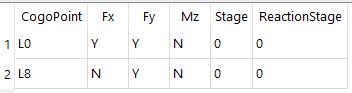
Input Nodal Boundary Condition
Table tbNodalBoundaryCond
- PURPOSE:
Define nodal contraints. A bridge model MUST be statically stable.
Parameters
tbNodalBoundaryCond Field
Type
Units
Description
CogoPoint
text
Cogo Point Name
Fx
chr
[Y|N] Constrain node translation in X direction
Fy
chr
[Y|N] Constrain node translation in Y direction
Mz
chr
[Y|N] Constrain node in rotation axis
Stage
int
Stage that this condition becomes effective.
ReactionStage
int
Stage to apply reactions back into analysis.
CogoPt
Enter a name of a COGO point to be constrained. The same point can be listed multiple times. See the notes below on multiple point entry.
Fx,Fy, and Mz
Enter a “Y” in this field to constrain the point in that DOF.
Stage
Normally a constraint is active in every stage, but this field can be used to specify that a constraint only be active in a single stage. If this entry is used, also use the Reaction Stage entry or else the forces resisted by this constraint will be lost and not re-applied to the model. This might be what is intended but typically not if this feature is used to simulate form-work.
Reaction Stage
If the Stage feature is used (described above) then specify the stage that the constrained forces are to be re-applied to the model.
- Duplicate Point Entry Note
If the same Cogo Point is listed multiple times for the same stage, then the resulting boundary condition is the “OR” of all fixity codes. For example, if point AA is listed once with a constraint in the Fx direction, and on another line is listed as having a constraint in the Fy direction, then point AA will be constrained in both the Fx and Fy directions. This makes entry more convenient when point constrains are listed by purpose, not by point number. For example listing all physical supports, then simplification constrains, then model stability constraints.
Example